
Most camera-AI projects stop at the alert. A person without a vest, a forklift too close, a blocked exit: each one lands in a queue, gets reviewed and is closed. That is useful. It is also a stream of single events, and single events are hard to manage. You can react to them. You cannot plan with them.
Measure is the second of the four steps (Detect, Measure, Comply, Improve), and it asks a different question of the same cameras. Not “what just happened?” but “how much, how long, and is it getting better?”
A rule tells you when. A measurement tells you how much.
In FloFusion a measurement is a separate thing from a rule. It keeps counting, minute by minute, on the FloFrame box at the site, and it keeps counting when the internet is down. Measuring never changes what alerts. There are five kinds:
- Who is in a zone. How many people or vehicles are inside an area, now and at its peak.
- Crossings of a line. In, out and net, at an entrance, a gate or a walkway. Jitter on the line never counts twice.
- A queue. How long it is and how long each person waited.
- How long they stay. Dwell in a zone: a truck at a dock, an operator at a station, a shopper at a stand.
- How long a rule holds. The share of the day a condition is true, such as a dock in use or a bay unattended.
Occupancy, dwell and queues can each carry a limit. Time spent above it is counted as “over the limit” and drawn as a dashed line on the chart. If you also want an alert when a limit is broken, you add a rule for it. The number and the alarm stay separate, so you can watch a limit for a month before you decide it deserves a siren.
Occupancy against limits, not just counts
A count on its own is a fact. A count against a limit is a decision. “Eleven people on the balcony” means little until you know the limit is ten. FloFusion’s Traffic & Occupancy screen shows people in, the busiest hour, the peak inside, the average queue and the time over the queue limit, with a table per entrance, zone and queue. Dwell & Utilization shows how much of the time a zone is in use, the number of visits, the average visit and the time nine in ten visits stayed under. That last figure matters: averages hide the long tail, and the long tail is where trucks miss slots and shoppers walk out.
These screens show totals and averages only, never individual people. And gaps are not zeros: an hour with a camera offline shows as a gap, not as an hour where nothing happened.
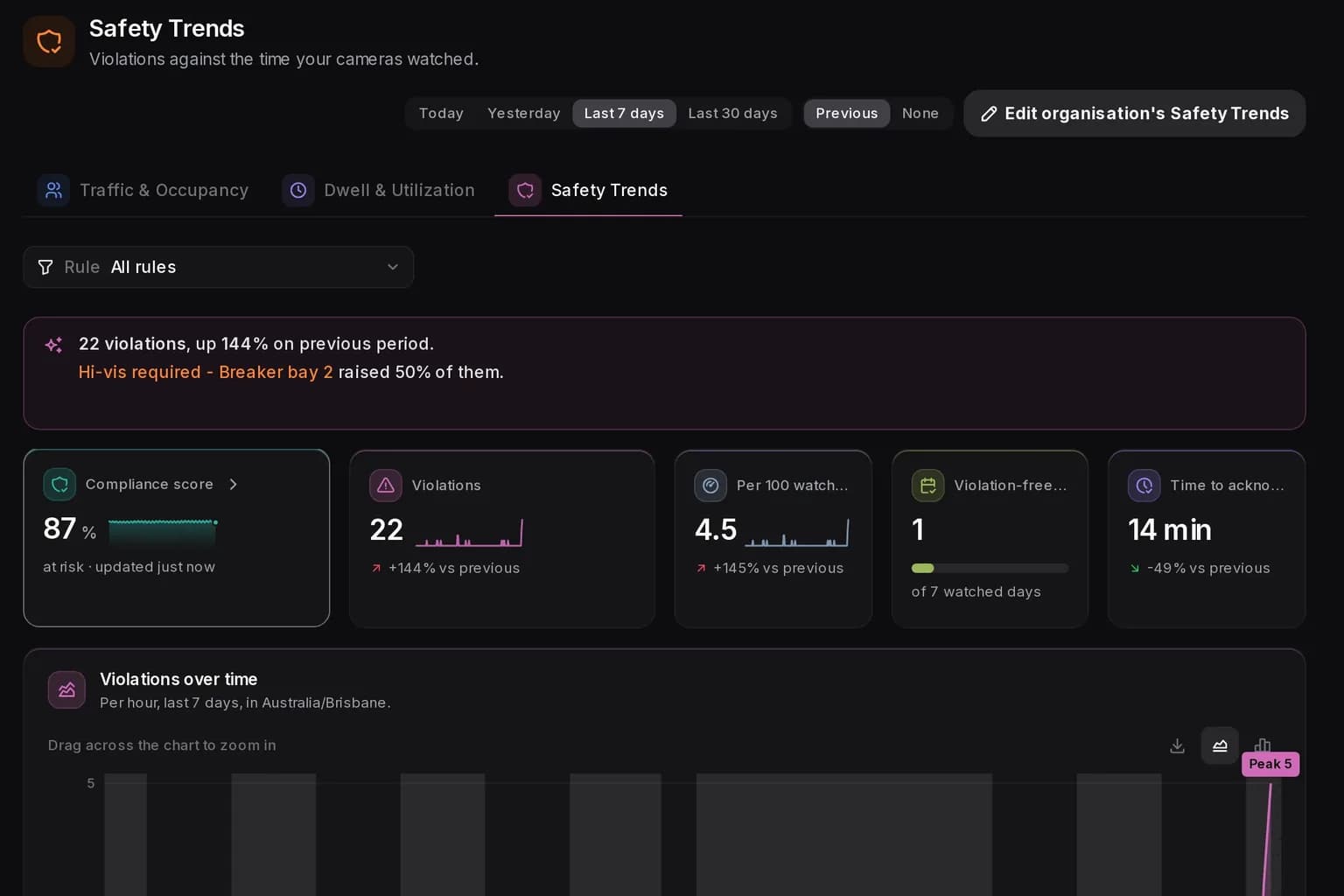
Violations per 100 watched hours
Raw violation counts mislead. A site with forty cameras will log more violations than a site with four, and a week with a camera down will look safer than it was. Safety Trends divides violations by the time your cameras actually watched, then multiplies by 100: violations per 100 watched hours.
Watched time is counted per camera and per minute, so a camera watched by three rules counts once, not three times. A site needs at least one watched hour before it gets a rate at all; below that it says “too little watched time” rather than showing a number nobody should trust. The result is a rate you can compare between periods and between places, because a site with more cameras doesn’t look worse just because it watches more.
Info alerts are observations, not violations
Not every alert is a breach. An operator arriving at a station, a truck at a dock, a shopper waiting at a promotion stand: these are things you want to know, and things you want to count. They are not things anyone did wrong.
Every rule has a severity: info, warning, error or critical. A violation is an alert at warning or above that wasn’t deleted and wasn’t held back by the vision-language model check. An info alert is an observation. It stays on the Alerts page and in the measurements, and it never counts as a violation, in Safety Trends or in the compliance score. Each alert keeps the severity it had when it fired, so changing a rule later doesn’t rewrite last month’s numbers.
This one setting does more for trust than any chart. When people see their routine work counted as violations, they stop believing the numbers. Keep the observations, and keep them out of the violation rate.
Comparing sites over time
A number becomes useful when you can say “better or worse than what?” Every Insights screen compares the period you pick (today, yesterday, seven or thirty days) with the one before: the same day last week for a single day, the previous period for longer spans. The comparison is drawn as a dashed line, and every tile shows the change as a signed figure.
Across sites, two tables do the work:
- Traffic by site: people in, people in per open hour (so a site open longer doesn’t simply look busier, because opening hours come from each site’s calendar), peak inside and queue wait.
- Safety by site or by camera: violations, watched hours, the rate per 100 watched hours, and how each compares with the median, flagged when it sits well above or well below.
Numbers you can check
Counting lines are only as good as the camera angle and the line you drew. Rather than promise a headline accuracy figure, FloFusion lets a site check its own lines with a count audit: someone tallies a line by hand for a period, and FloFusion sets the tally beside its own count for the same minutes and shows the accuracy. Run one when a line goes live and again after any camera moves. A number that has been audited on your own floor is worth more than any figure on a datasheet.
Where to start
Pick three numbers, not thirty. Typical first choices:
- a violation rate per 100 watched hours for the one or two rules that matter most;
- occupancy against a limit for the zone where crowding is a known risk;
- dwell or time in use for the asset that costs money when it waits, such as a dock, a line or a till.
Set the limits you already have on paper, mark the routine events as info, and let a month of history build before you judge anything. Then the alerts stop being noise and start being the raw material for a number someone owns.


